SamNet WG
Complete WireGuard VPN Management Made Easy
One script. Full deployment. Complete control.
What Is It?
SamNet WG is a complete, enterprise-grade WireGuard VPN management solution that transforms any Linux server into a secure VPN appliance in under 5 minutes.
Unlike simple installation scripts, SamNet WG provides full lifecycle management: peer creation, temporary access with auto-expiry, data limits, QR codes for mobile, and a synchronized Web UI for remote management.
It features a unique Dual-Control Plane architecture:
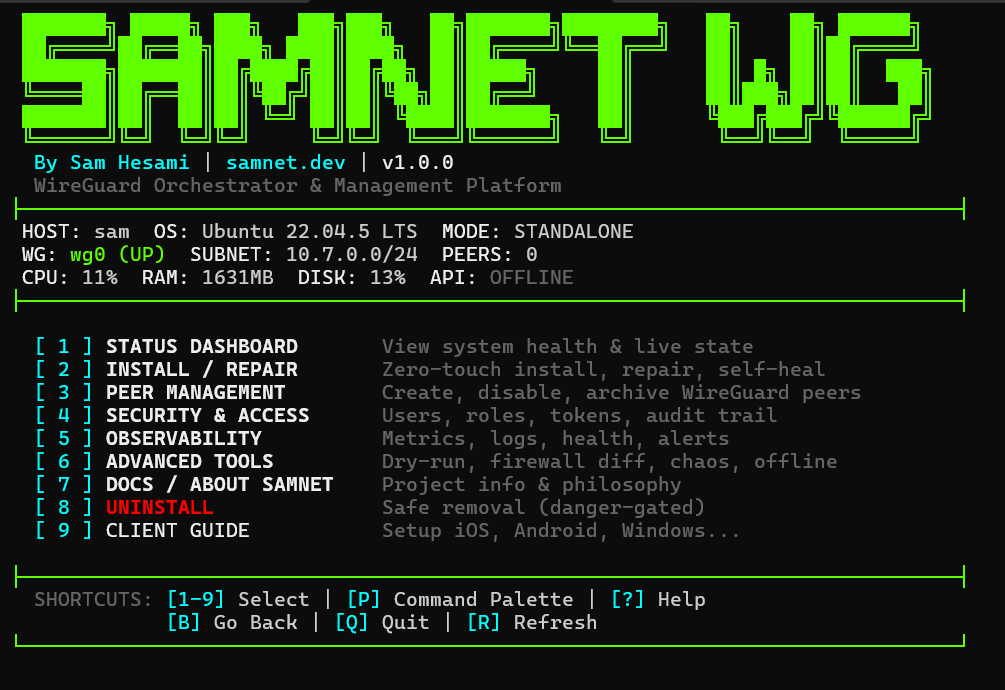
- High-Performance TUI: A beautiful, flicker-free terminal interface for zero-latency management.
- Modern Web Dashboard: A synced, React-based web UI for remote administration.
Terminal Interface
The TUI provides instant access to all management features:
Key Features
- Zero-Touch Deployment: One script installs everything - WireGuard, Docker, API, and Web UI.
- Beautiful Terminal UI: High-performance, flicker-free TUI with instant navigation.
- Modern Web Dashboard: React-based UI for remote peer management.
- Temporary Peers: Create time-limited access that auto-expires (1-365 days).
- Data Limits: Enforce bandwidth caps per peer (e.g., 10GB/month).
- QR Code Generation: Instant mobile client onboarding - scan and connect.
- Bi-Directional Sync: CLI and Web UI are always perfectly synchronized.
- Raspberry Pi Ready: Runs efficiently on Pi 4 and up.
- Bulk Peer Creation: Create multiple peers at once for teams or events.
- Audit Logging: Track all changes with timestamps and user info.
Quick Install
Deploy a complete VPN appliance in under 60 seconds:
git clone https://github.com/SamNet-dev/wg-orchestrator.git
cd wg-orchestrator
sudo ./samnet.sh
The installer will guide you through:
- Detecting your public IP automatically
- Choosing CLI-only or Web UI mode
- Setting up the WireGuard subnet
- Building and deploying Docker containers
After Installation
- Terminal: Run
sudo samnetfrom anywhere - Web UI: Open
http://your-server-ipin a browser
Web UI Default Login
Username: admin | Password: changeme
Requirements
- OS: Ubuntu 20.04+, Debian 11+, Raspberry Pi OS
- RAM: 512 MB minimum
- Disk: 100 MB (CLI) / 500 MB (with Docker)
- Network: Public IP or port forwarding (UDP 51820)
Security
- Argon2id password hashing
- CSRF tokens on all state-changing requests
- Strict input validation preventing ghost peers
- Scoped Docker cleanup (never touches your other containers)
- Private key encryption at rest
Use Cases
- Home Lab: Secure access to your home network from anywhere.
- Small Business: Remote access without expensive enterprise solutions.
- Events: Temporary peers with auto-expiry for attendees.
- IoT Networks: Secure communication between devices.
Get Started
Open source. MIT Licensed. Contributions welcome.